Automated candidate vetting
Know who you’re hiringBefore you make the hire
Let CandidateHire360 do the vetting.
AI-powered public-information research, identity resolution, and confidence-based matching bring candidate information together in one place, so your hiring team can understand what was found, review what matters, and make a more informed decision.
Already a member? Sign inJust looking? Explore the fictional demo (no account needed)
- Private beta
- Invitation only
- Research is currently demonstrated with fictional data

The problem
Searching a name is easy. Knowing what the results mean is not.
Informal online checks are fast, inconsistent and hard to defend. The hard part isn’t finding results; it’s deciding which belong to your candidate, which matter for the job, and which should never be considered at all.
- 01
Most results aren’t about your candidate
Search a name and you get other people with the same or a similar name. Attributing their records to your candidate is unfair to the candidate and misleads your team.
- 02
Not everything found should be considered
What matters depends on the role’s duties. Protected and personal information should never shape an employment decision, even when it turns up.
- 03
The information is scattered
Résumé, application, interview and public sources rarely line up on their own. Inconsistencies go unnoticed, and later nobody can show what was checked, or why.
How it works
The investigative work happens first. Your review comes after.
Four steps, from the job to the decision. CandidateHire360 does the research and the sorting; people do the judging.
- 1
Open the job
Each job opening records its duties, such as financial authority, licensed work or access to vulnerable people. The duties decide what is relevant.
- 2
Add the candidate
Upload the résumé, application, interview transcript and emails. Candidate Details turns them into facts, each linked to where it was said.
- 3
CandidateHire360 does the vetting
It checks the public sources in scope for the opening, works out which results belong to your candidate, and assesses what may matter for the role.
- 4
Your team reviews what matters
You get an Executive Vetting Summary and only the few items that need a person’s judgment. The decision stays yours.
Step 2 · Candidate Details
Every fact knows where it came from
Candidate Details is the intake: employment, education, credentials and contact details drawn from the candidate’s own documents, with the source page, line or interview timestamp beside each fact. Facts can be corrected or removed. Protected and sensitive details are excluded from extraction by policy.


Step 3 · Vetting
Research you can account for
Vetting runs the sources in scope for the opening, from professional profiles and news to public records and licensing lookups. Research coverage shows what was searched, what returned results, and what couldn’t be checked, so the file always shows its own limits.
What you get
One Executive Vetting Summary, with the information behind every line
The summary answers the reviewer’s first questions at a glance: what needs attention, whether the results are really this person, and how complete the research was.

Answer first, information one click away
- Items for attention: the few findings that need a person, each with a plain-language assessment.
- Identity confidence: High, Moderate or Low, and what the match rests on.
- Research coverage and employment corroboration: what was searched, and whether independent sources support the candidate’s history.
- Filtered and withheld: a count of what was excluded, with protected information kept out of view.
- Primary issues to review: each links straight to the finding and to the line in the candidate’s document.
Information only. There is no overall score, rating or hiring recommendation, anywhere in the product.
Findings, sorted before anyone reads them
Everything research returns lands in a layer, so reviewers spend their time on the first and can audit the rest.
- Items for attention
- Potentially relevant to the role, or a possible match whose identity matters. These are the review items.
- Relevance uncertain
- Available if you want to look, but not on your list.
- Background
- About the candidate, with no apparent relevance to the role. No action needed.
- Possible matches
- Moderate identity confidence and nothing that seems to matter: recorded as a research limitation, not a task.
- What we filtered out
- Excluded from evaluation: not relevant, or protected and personal information, which stays hidden and is never described in the report.
- Other people with similar names
- Set aside, never treated as the candidate’s and never a task.


Human review and dispositions
For each item, a reviewer chooses:
- Flag for consideration
- No concern
- Needs more information
- Not relevant
- Leave unresolved
Notes are optional, decisions can be reopened, and each one is recorded with the reviewer’s name and date.
Disputes
When a candidate disputes a finding, the dispute is recorded against it and stays open on the Dashboard until a reviewer resolves it as upheld or corrected, with a reason.
The Vetting Report
A complete record of who was vetted, for which job, what was checked and found, what was excluded, and what reviewers decided. Print it or save it as a PDF.

See it with your own openings
CandidateHire360 is in a private, invitation-only beta. Reserve your place, or look around the read-only fictional demo first: no account needed.
What it looks like
A workspace built for the team that vets every week
Designed for the twenty-fifth visit, not just the first: the work comes first, and the explanation is there when you need it.
Dashboard
Where the workload is, what needs a person, research coverage and workload by job opening.
Job Openings
Each opening’s duties and its own pipeline: Intake unfinished, Ready to vet, Needs attention, Vetting complete.
Candidates
Every candidate’s vetting status and open items, filterable by status and opening, sortable by column.

Identity confidence
Is this result really your candidate?
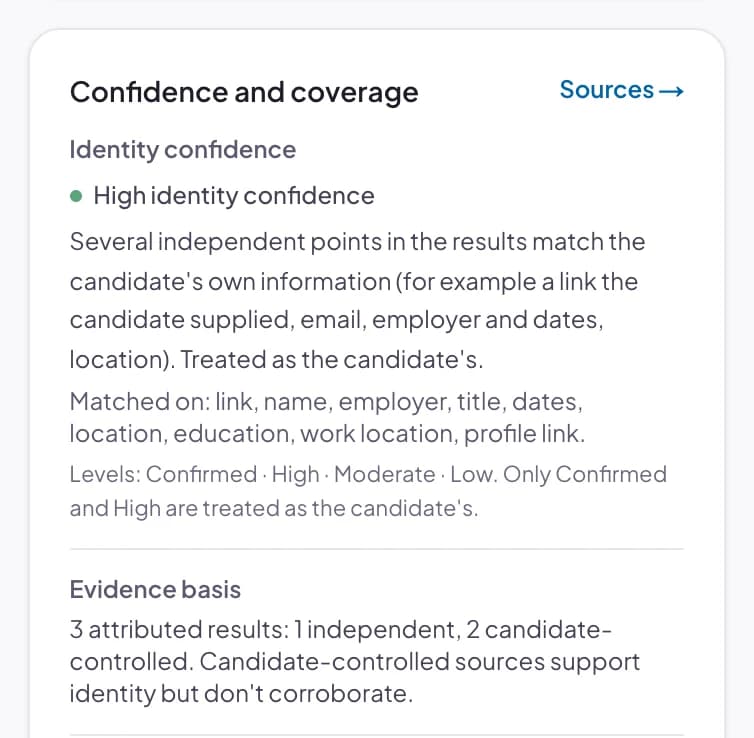
Common names produce dozens of results about other people. Each result is compared with the candidate’s own information and given a category, with the reasons in plain language so anyone can see why.
- High identity confidence
- Treated as the candidate’s, and still correctable.
- Moderate identity confidence
- Brought to a person only when the content might matter.
- Low identity confidence
- Someone else with a similar name. Set aside, never a task.
Identity confidence measures one thing: whether a result belongs to the right person. It is categorical, with no invented percentage, and it is never a candidate quality, risk or suitability score, a ranking, or a hiring recommendation.
Why it matters
Fairer to candidates. Clearer for your team.
Vetting that is careful about identity, relevance and protected information is easier to stand behind, for the candidate and for you.
The human always decides
No candidate score, rating, ranking or hire/no-hire recommendation. CandidateHire360 presents the information; your reviewers decide.
Every statement shows its source
Findings link to the sources behind them and to the exact page, line or timestamp in the candidate’s documents.
Protected information stays out
Protected and personal information is filtered out of evaluation and kept out of view. The Vetting Report counts it; it never describes it.
Namesakes never become homework
Results about someone else with a similar name are set aside. Routine no-results and weak possibilities don’t become tasks.
Limitations describe the research
When a source can’t be searched, that is recorded as a limit of the research, never as something about the candidate.
Background screening is separate
CandidateHire360 is public-information vetting. Consumer reports and criminal-history checks are not part of it.
Fits into your hiring ecosystem
Focused vetting that complements your hiring process
- Public-Information Research
- Identity Resolution & Verification
- Source-Backed Findings
- Human-Reviewed Exceptions
Full-suite hiring applications provide comprehensive tools for recruiting, interviewing, evaluating and developing candidates and employees.
CandidateHire360 complements that process with a specialized layer focused on public-information research, identity resolution and source-backed findings, helping hiring teams understand what was found and focus human review on what matters.
Where CandidateHire360 is today
A private beta, stated plainly
- Invitation only. Reserve your place and we’ll be in touch as places open. A reservation doesn’t create an account; access comes only with an email invitation.
- Research is demonstrated with fictional data. Live public-information research is not yet enabled. The research you see runs over an invented world of people, pages and records.
- Every image on this page is the real product, captured with fictional candidates in the fictional demo organization. No screen is mocked up.
- A read-only fictional demo is open to everyone, no sign-in needed.
Know who you’re hiring before you make the hire
Already a member? Sign in. New to CandidateHire360? Reserve your place in the beta.